"Sir, online payment kaise accept karoon?" — This is the single most common question I get from Pakistani business owners. Last month, a woman from Gujranwala who sells handmade embroidered clothes messaged me exactly this. She had a beautiful Instagram page, a simple website, but every customer kept asking: "Can I just pay online?" And she had to say no.
I remember feeling that frustration myself back in 2020. I had built my first freelance portfolio site, a client wanted to pay me through the website, and I had NO idea how to add a payment gateway to my website. I spent two weeks reading confusing documentation, almost gave up, and then finally figured it out.
This guide is everything I wish someone had told me back then. No confusing jargon. No assuming you're a tech genius. Just practical, step-by-step help for Pakistani business owners, freelancers, and entrepreneurs who want to accept online payments securely and professionally.
And hey, if you get stuck anywhere, remember you can always ask the EduTech AI assistant for help — it's like having a patient developer friend available 24/7. Now, let's dive in! 💰
📌 Key Takeaways (Read This First)
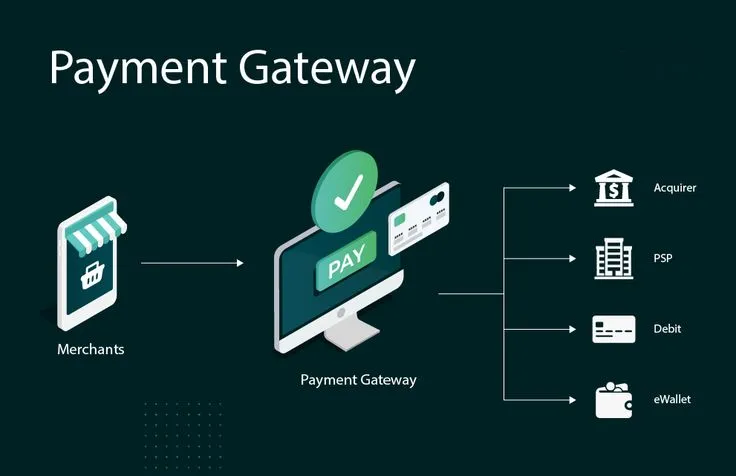
- ✅ A payment gateway is the secure bridge between your customer's bank and YOUR bank account.
- ✅ For Pakistani businesses, options include: Stripe (international), PayPal (global), Sadapay (local), and bank integrations.
- ✅ Payment gateway integration doesn't have to be hard — many platforms offer plugins that work in minutes.
- ✅ You MUST have an SSL certificate before accepting payments (that padlock icon in browser = trust).
- ✅ Always test in sandbox mode first — never go live without testing with fake cards.
- ✅ Use the EduTech AI tool to debug integration errors and generate secure code snippets.
The Night I Lost a Customer Because of No Payment Gateway (And What I Learned)
True story. I had spent weeks building a website for a client in the UK. Everything was perfect — design, content, speed. But I hadn't added a payment gateway yet. The client sent me a message: "I want to pay you through the site to test it."
I panicked. I fumbled. I said, "Um, can you just bank transfer?" He never replied. I lost that client because I wasn't ready to accept online payments. That night, I decided: never again.
The next week, I learned everything about ecommerce payment methods. I integrated Stripe into my site. And guess what? It took me just 2 hours once I knew what to do. That's why I'm writing this — so YOU don't lose customers like I did.
What Exactly Is a Payment Gateway? (Explained Like You're 5)
Imagine you're at a restaurant. You order food, eat it, then ask for the bill. You give your credit card to the waiter. The waiter takes it to the machine, swipes it, and brings back a receipt. You sign, and the money moves from your bank to the restaurant's bank.
The payment gateway is like that waiter — but for your website. It:
- Takes your customer's card information
- Encrypts it (so hackers can't read it)
- Sends it to the bank for approval
- Brings back a "yes" or "no"
- Tells your website what happened
All of this happens in 2-5 seconds. Magic? No — just really smart technology.
Why Adding a Payment Gateway Is Non-Negotiable in 2026
Let me be blunt: If you're running any kind of online business in Pakistan and you DON'T accept online payments, you're leaving money on the table. Here's why:
- 📈 Customers expect it: Even chai dhabas in Lahore now have QR codes. Your website should too.
- 🌍 International sales: Want to sell to customers in Dubai, UK, or USA? They won't do bank transfers.
- ⏰ 24/7 sales: While you sleep, your payment gateway works. No more "call me tomorrow to pay."
- 🔒 Professional image: A site with "Pay Now" button looks legit. A site asking for manual bank transfer looks like a scam.
- 📊 Automatic tracking: Every payment is logged. No more "bhai, did you receive the money?" confusion.
Popular Payment Gateway Options for Pakistani Businesses (2026)
Not all gateways work equally well for Pakistan. Here's my honest comparison based on helping dozens of local businesses:
🌍 Stripe — Best for International Sales
Works in Pakistan? Yes, through Stripe Atlas or if you have a US/UK LLC. Direct Stripe Pakistan is coming soon.
Fees: 2.9% + $0.30 per transaction
Best for: Freelancers, digital product sellers, SaaS businesses with international customers.
Pros: Beautiful checkout, developer-friendly APIs, supports MANY currencies.
Cons: Requires foreign company setup for Pakistanis (but worth it).
💰 PayPal — The Global Standard
Works in Pakistan? Yes — but only for sending payments. Receiving is restricted for personal accounts. Business accounts can receive but with limitations.
Fees: 4.4% + fixed fee based on currency
Best for: Freelancers on Upwork/Fiverr, international clients who insist on PayPal.
Pros: Widely trusted, easy to set up.
Cons: Higher fees, funds go to your bank account manually, occasional holds.
🇵🇰 Local Solutions — EasyPaisa, JazzCash, Sadapay
Works in Pakistan? Yes, fully local.
Fees: Varies (typically 1-3%)
Best for: Local businesses selling to Pakistani customers who prefer mobile wallets.
Pros: Familiar to Pakistani users, lower fees, faster settlements.
Cons: Only works for PKR transactions, limited international reach.
My recommendation for most beginners: Start with a local solution (EasyPaisas API or Sadapay) if your customers are in Pakistan. If you sell internationally, invest in setting up Stripe — it's worth the effort.
How a Payment Gateway Works (The Technical Side, Made Simple)
I promise to keep this painless. Here's what happens when someone clicks "Pay Now" on your site:
- Customer enters card details on your checkout form.
- Your website encrypts that data (think of it like putting it in a locked box).
- The payment gateway sends the locked box to the customer's bank.
- The bank checks if there's enough money and if the card is valid.
- Approval or denial comes back through the gateway to your site.
- Your website shows "Payment Successful" or "Payment Failed."
- Money moves from customer to you (usually within 2-3 days).
That's it. The payment gateway integration handles all the scary banking stuff so you don't have to.
Step-by-Step: How to Add a Payment Gateway to Your Website
Let me walk you through the exact process I use for my clients. I'll use Stripe as an example because it's the most common, but similar steps apply to others.
Step 1: Get an SSL Certificate (Non-Negotiable!)
Before ANY payment gateway works, your website MUST have HTTPS (that padlock icon in browser address bar). Most hosting providers offer free SSL through Let's Encrypt. If your site shows "Not Secure" — fix this first. No one will enter their card details on a non-secure site.
Step 2: Create a Payment Gateway Account
Go to Stripe (or your chosen provider), sign up, and verify your email. For Stripe, you'll need to provide business details. For local providers like Sadapay, you'll need your CNIC and bank account info.
Step 3: Get Your API Keys
Once approved, go to your dashboard and find "API Keys." You'll get two important things:
- Publishable Key (safe to put in your website's frontend)
- Secret Key (keep this HIDDEN — never share it)
Step 4: Choose Your Integration Method
Depending on your platform:
- WordPress/WooCommerce: Install a free plugin like "WooCommerce Stripe Payment Gateway." Enter your keys in settings. Done in 10 minutes.
- Custom PHP site: Use Stripe's PHP library. Copy their "checkout" example code, paste your keys, and customize.
- Shopify: Go to Settings → Payments → Add payment method. Select Stripe, log in, and you're connected.
Step 5: Test in Sandbox Mode (CRITICAL!)
Switch your gateway to "Test Mode" or "Sandbox Mode." Use test card numbers (Stripe provides: 4242 4242 4242 4242 for successful payments). Try every scenario: success, failure, insufficient funds, card declined. Fix any bugs BEFORE going live.
Step 6: Go Live!
Once testing works perfectly, switch to Live Mode, replace test keys with live keys, and process a real transaction (even PKR 10). Verify that money reaches your account. Congratulations — you're now accepting online payments! 🎉
Integration on Popular Platforms (Quick Guides)
Here's how to add payment gateway to website on specific platforms:
- WordPress + WooCommerce: Plugins → Add New → Search "Stripe" or "PayPal" → Install, activate, enter API keys in WooCommerce → Settings → Payments.
- Shopify: Built-in! Just go to Settings → Payments → Activate Shopify Payments or add third-party gateway.
- Custom HTML/CSS/PHP: Use Stripe's prebuilt Checkout page (easiest) or Elements (more customizable). Copy their 20-line code snippet, paste your publishable key, done.
If you're not a developer, don't worry. Most platforms have plugins that require ZERO coding. And if you get stuck, the EduTech AI assistant can generate the exact code you need for your specific setup.
Security Best Practices (Don't Skip This!)
Accepting payments means you're handling sensitive data. Here's how to stay safe:
- 🔐 Always use HTTPS — not just on checkout, but your entire site.
- 🔑 Never store raw card details — let the gateway handle that (tokenization).
- 🛡️ Enable 3D Secure — adds OTP verification, reduces fraud.
- 📦 Keep everything updated — old plugins = security holes.
- 👀 Monitor for suspicious activity — sudden spike in failed payments? Investigate.
- 📋 Have a privacy policy — tell users how you handle their data (legally required in many countries).
Improving Your Checkout Experience (So Customers Actually Pay)
Even with a perfect online payment setup, a bad checkout experience will kill your sales. Here's what works:
- ✂️ Minimize fields — Ask only for: Name, Email, Card number, Expiry, CVC. Nothing else.
- 👤 Allow guest checkout — Forcing account creation loses 30%+ of customers.
- 📱 Make it mobile-friendly — Most payments happen on phones now. Test on YOUR phone.
- 🏷️ Show total clearly — Don't surprise with shipping/taxes at last step.
- 🛡️ Display trust badges — "Secure Checkout" and payment method logos reassure nervous buyers.
Handling Refunds, Chargebacks, and Disputes
Unfortunately, not every transaction goes smoothly. Here's what to do:
- Refunds: Most gateways let you issue full or partial refunds from dashboard. Do it quickly — happy customers return.
- Chargebacks: When a customer disputes a charge with their bank. Respond with evidence (order details, delivery proof). Too many chargebacks = gateway may ban you.
- Prevention: Clear refund policy, good customer service, and delivery tracking reduce disputes by 80%.
Legal Requirements for Accepting Online Payments in Pakistan
You don't need to be a lawyer, but know these basics:
- 📄 Have clear terms and conditions — What happens if product is defective? What's your refund window?
- 🔒 PCI DSS compliance — Most gateways handle 99% of this. Just don't store card details yourself.
- 📝 Privacy policy — Explain what customer data you collect and why.
- 💳 Business bank account — Some gateways require this instead of personal account.
Future Trends in Payment Gateways (Stay Ahead)
The world of ecommerce payment methods is changing fast. Watch for:
- 📱 Mobile wallets domination — EasyPaisa, JazzCash, and Sadapay are becoming default.
- 🔄 Buy Now, Pay Later (BNPL) — Tabby and similar services coming to Pakistan soon.
- 🤖 AI fraud detection — Gateways getting smarter at catching fraud without blocking real customers.
- 💎 Crypto payments — Some gateways now support crypto with instant conversion to PKR.
The best advice? Start simple. Master one gateway. Then add more options as you grow.
Final Thoughts: Stop Procrastinating, Start Accepting Payments
Look, I know payment gateway integration sounds intimidating. I've been there. But here's the truth: If you can copy-paste a code snippet or install a WordPress plugin, you can add a payment gateway TODAY.
The longer you wait, the more customers you lose to competitors who accept online payments. Don't be like me — don't lose a client because you weren't ready.
Start with a free account on Stripe or Sadapay. Use test mode to practice. When you're comfortable, flip the switch. And remember, the EduTech AI assistant is always here to help with specific questions, error messages, or code examples.
Your customers are ready to pay. Are you ready to accept? 💰
❓ Frequently Asked Questions (FAQ)
1. Which payment gateway is best for small businesses in Pakistan?
For local customers: Sadapay or EasyPaisa (lower fees, familiar to Pakistanis). For international customers: Stripe (best developer experience, global reach). Most small businesses start with Sadapay and add Stripe later as they grow.
2. How much does it cost to add a payment gateway to my website?
Most gateways have NO setup fee or monthly fee. You pay per transaction (typically 2-4% + small fixed fee). Some local Pakistani options have even lower rates. The only cost is your time to integrate.
3. Is it safe to accept online payments on my website?
Yes — if you use a reputable payment gateway (Stripe, PayPal, Sadapay) and have an SSL certificate. These gateways are PCI DSS compliant, meaning they follow strict security standards. Never store card details yourself; let the gateway handle it.
4. How long does it take to integrate a payment gateway?
On WordPress/WooCommerce: 15-30 minutes. On Shopify: 5 minutes (built-in). On custom site: 2-4 hours for a developer. Most of the time is account verification, not actual coding. The EduTech AI assistant can help you debug any issues quickly.
5. Can I accept credit cards on my website without a payment gateway?
No. You need a payment gateway to process credit card transactions. However, some platforms (like Shopify Payments or Stripe) act as both the gateway and merchant account. There's no legal way to process credit cards directly without a gateway — it's too risky and violates banking regulations.
💰 Ready to Start Accepting Payments Today?
Stop losing customers because you don't have a payment gateway. Use the EduTech AI Assistant to generate integration code, debug errors, and get step-by-step help tailored to YOUR website.
🤖 Get AI-Powered Payment Gateway Help (Free)Join 2,000+ Pakistani businesses now accepting online payments.